

Import and Export Behavior
This page explains what AttendFlow does when you import, export, back up, or restore data.
Import behavior
Section titled “Import behavior”Most imports use a preview before commit flow:
- You choose a file.
- AttendFlow validates the file.
- AttendFlow shows which rows or records will be added, updated, deleted, or rejected.
- You confirm before local data is changed.
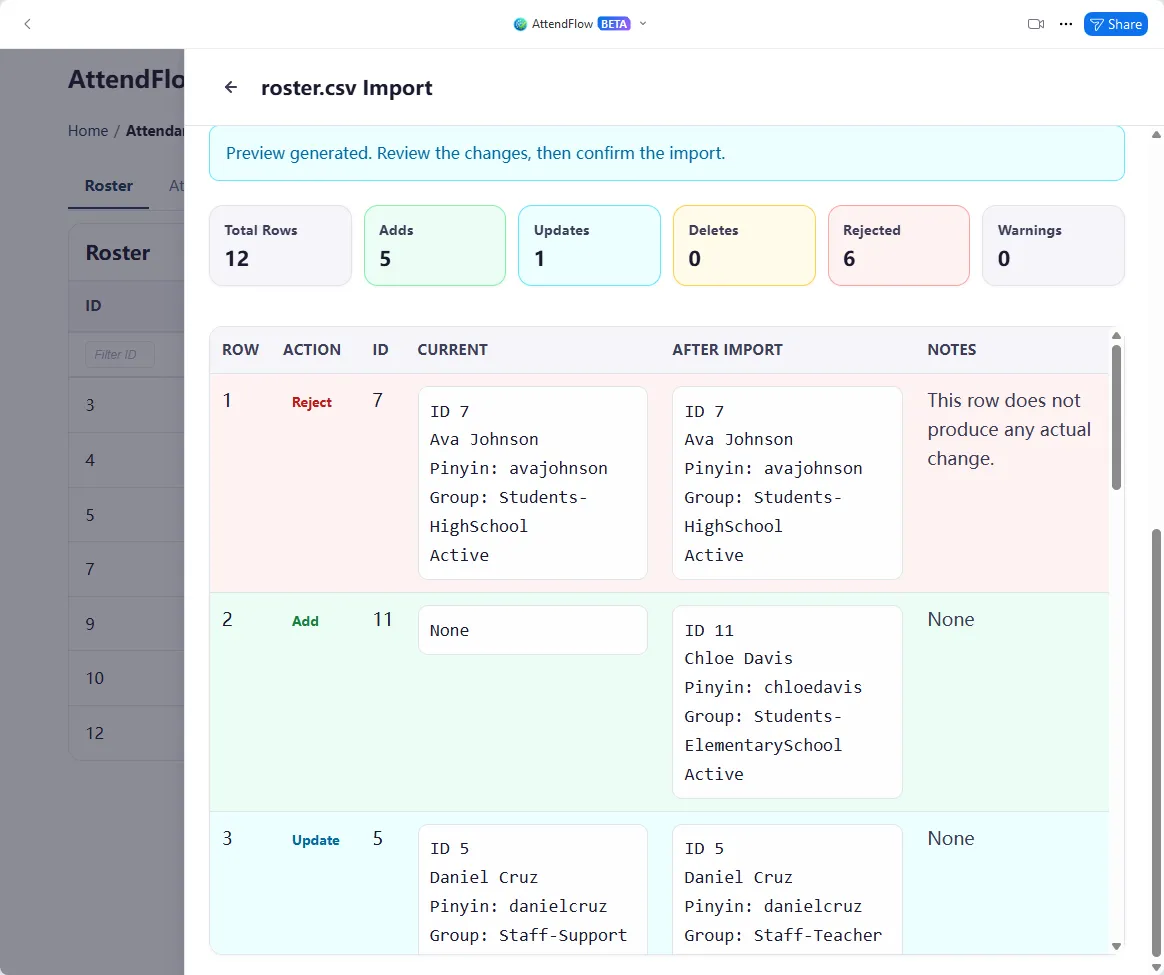 Example of roster CSV import preview showing planned changes before commit.
Config data imports
Section titled “Config data imports”Roster and Name Matching CSV
Section titled “Roster and Name Matching CSV”- Accept Chinese or English headers.
- Add new rows when no matching existing ID is provided.
- Update existing rows when a matching ID is provided.
- Delete existing rows when the import marks them for deletion and the matching ID is present.
- Show all planned adds, updates, deletions, and rejected rows in the preview before anything is committed.
If you prepare CSV files by hand or in a spreadsheet, AttendFlow still expects the required fields and valid values described in the field references. Header language can be Chinese or English regardless of the current UI language.
Attendance Profile JSON
Section titled “Attendance Profile JSON”- Supports bulk add, update, and delete operations.
- Is better suited to backup or transfer than hand-editing inside a spreadsheet.
Attendance Profile imports also go through preview before commit so you can confirm which profiles will be created, replaced, or removed.
Config data exports
Section titled “Config data exports”Roster and Name Matching CSV
Section titled “Roster and Name Matching CSV”- Export all entries or only the currently selected entries.
- Use CSV when you want spreadsheet editing or need to share the data with another operator.
- CSV header language follows the current Export Language setting in Other Settings.
Attendance Profile JSON
Section titled “Attendance Profile JSON”- Export all profiles or only the selected profiles.
- Use JSON when you want an accurate backup or to move profiles to another computer.
Updating or deleting existing config entries by import
Section titled “Updating or deleting existing config entries by import”For Roster and Name Matching CSV imports, existing rows are matched by ID.
- If the ID matches an existing row, AttendFlow treats the row as an update.
- If the ID is missing or does not match, AttendFlow treats the row as a new entry.
- If the row marks delete and the ID matches, AttendFlow treats it as a deletion.
All of these outcomes appear in the preview before you confirm the import.
Attendance record imports
Section titled “Attendance record imports”- Accept record JSON bundles.
- Can restore previously exported records back into the app.
- Do not rely on CSV re-import for full-fidelity restore.
Export behavior
Section titled “Export behavior”- Exporting does not delete local data.
- A single attendance record can be exported in more than one format.
- CSV header language follows the current Export Language setting.
- JSON exports are the best choice for archival and later re-import.
For attendance records:
- JSON preserves the richest data and is the best format for restore or long-term storage.
- Summary CSV is best when you need a spreadsheet-friendly output for reporting.
- Manual attendance records CSV is available when the meeting includes manual attendance checkpoints.
Full backup and restore
Section titled “Full backup and restore”AttendFlow also supports a broader backup and restore flow from Other Settings.
- Full backup is intended for device migration or disaster recovery.
- Restore is blocked while a live attendance record is still active.
- Keep a fresh backup before large cleanup imports or restore operations.
Practical guidance
Section titled “Practical guidance”- Use CSV when you need spreadsheet editing for roster or Name Matching data.
- Use JSON when you need accurate archive restore or long-term storage.
- Review preview results carefully before committing destructive imports.
- Keep a fresh full backup before large cleanup imports or restore operations.
Related Links
Section titled “Related Links”- Import and Export Attendance Records - Operator-facing attendance record import and export workflow.
- Other Settings - Export language, full backup, restore, and local data tools.
- Roster Import Fields - Exact roster CSV field requirements.
- Name Matching Import Fields - Exact Name Matching CSV field requirements.
- Attendance Records JSON Fields - JSON field-level reference.